Snyk Fetch The Flag CTF 2026
Snyk returned again to host their annual Fetch The Flag CTF challenge from February 12th-13th.
For the busy week I had, I did take a small opportunity to work through a couple challenges, and I’m going to share a walk through of them here.
I do wish I had the time to work through more but I’m still grateful to have had the chance to spend even just a couple hours working on the few that I did.
Overall, I solved 3/22 challenges, scoring 1200 points, and finishing 178/1539 teams.
Challenges
I mainly focused on the crypto and forensics categories, solving 3 challenges and finding a total of 12 flags.
Void Step
Forensics - Easy
You’re a SOC analyst at Sfax-Tech.
Your team lead rushes in: “A client server triggered multiple alerts.
The system isolated it and saved the traffic.” She hands you a USB with a PCAP file. Find out what happened.
Time is critical.
For this challenge we were given a traffic capture to analyze and answer the following 10 questions.
1. How many decoy hosts are randomized in this reconnaissance evasion technique? - 11
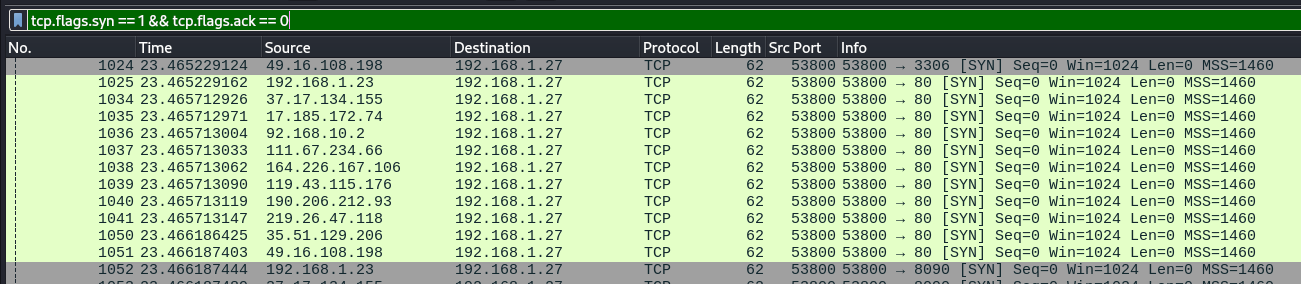
For this question I applied the filter tcp.flags.syn == 1 && tcp.flags.ack == 0.
Within the filtered results I noticed a section of 11 light green colour coded packets, which stood out in contrast to the grey of everything else.
Each of those packets were from different IP addresses but all sending to the same destination. I did also note that IP down as the possible victim.
2. What is the real attacker IP address? - 192.168.1.23
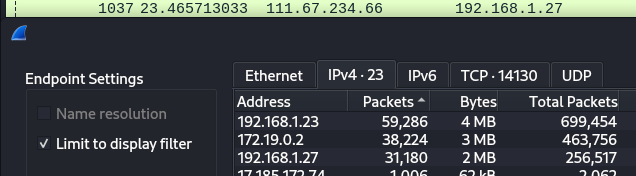
Based off the last question, I went into endpoints to see which IP had the highest amount of packets.
3. How many open ports did the attacker find? - 4
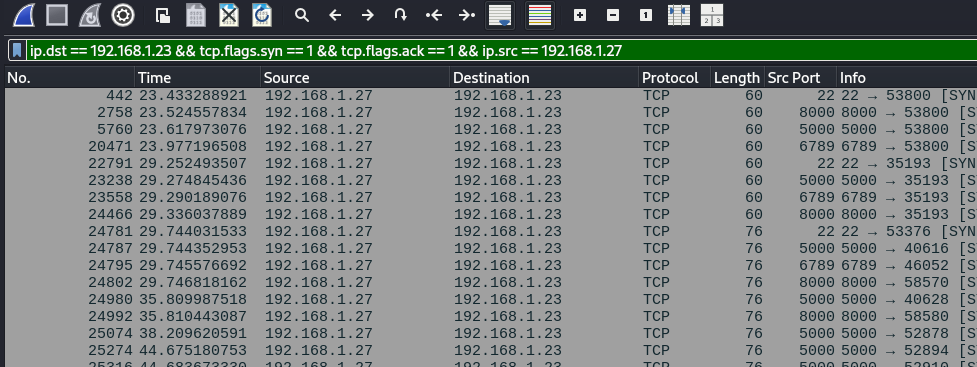
For this one I applied the filter ip.dst == 192.168.1.23 && tcp.flags.syn == 1 && tcp.flags.ack == 1 && ip.src == 192.168.1.27 - including the real attacker IP address and the IP address that I thought might possibly belong to the victim.
I noticed within the filter results that it listed four ports, repeated them a few times, and then only listed port 5000 over and over again.
4. What web enumeration tool did the attacker use? - gobuster
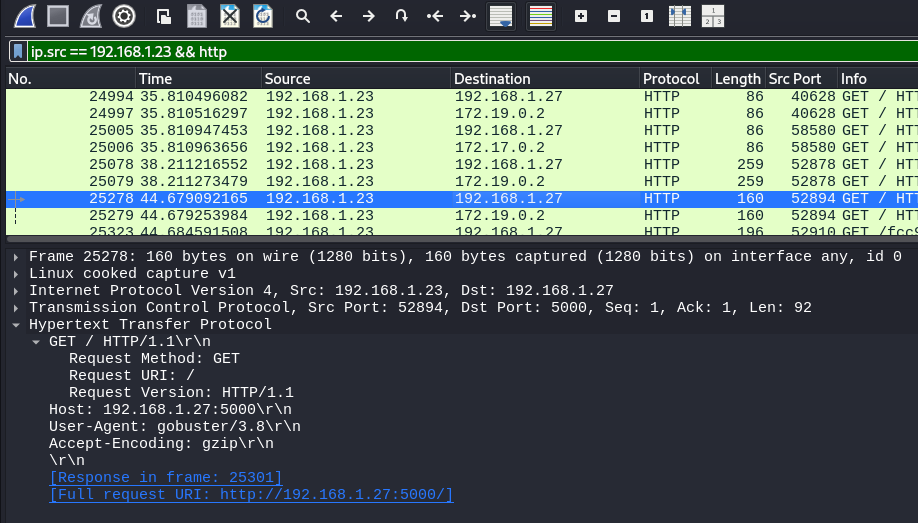
I applied the filter ip.src == 192.168.1.23 && http, then I began sifting through the remaining packets, looking at the Hypertext Transfer Protocol section of each packet.
Within packet 25278, I spotted gobuster listed next to User-Agent.
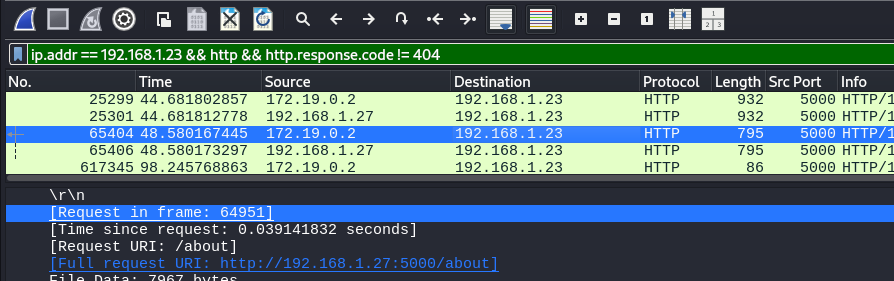
5. What is the first endpoint discovered by the attacker? - /about
For this question I built off the filter used in the previous question, adding && http.response.code != 404 to the end of it.
Similar to that question as well, I began sifting through the packet data again, checking out the Full request URI line of each one, where I eventually found /about in packet 65404.
6. What was the first file extension tested during the enumeration? - html
I went back to using the filter that helped me solve question four, then within the info column of the packet pane, I looked for the first one to include a file extension.

7. What is the full vulnerable request parameter used in the attack? - file
When originally searching for this one I had gone a layer too deep and actually answered the next two questions first, but here’s what I eventually figured out.
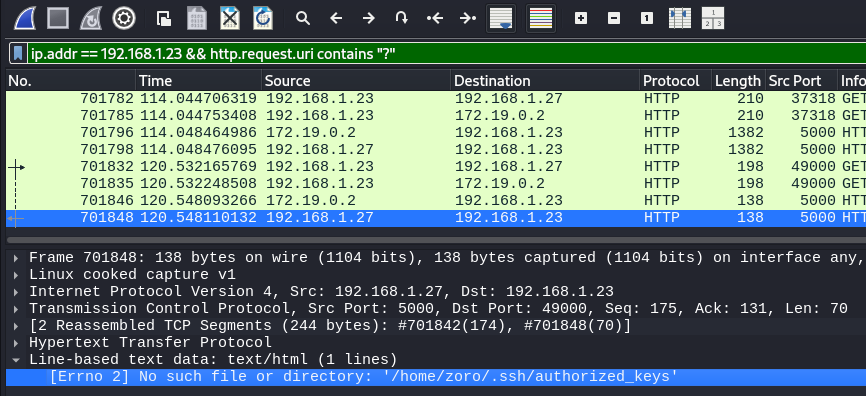
On the right side of the packet pane, under the info column, specifically within packets 701832 and 708135, you can see an endpoint (read), parameter name (before the equals sign file), and the parameter value (comes after the equals sign, %2Fhome...).
For this question, we’re looking for the parameter name, which is file.

8. What is the username discovered by the attacker? - zoro
9. What authentication-related file did the attacker attempt to access? - /home/zoro/.ssh/authorized_keys
I found the answer for this one and question eight through the same packet, 701848, and filter, ip.addr == 192.168.1.23 && http.request.uri contains "?".
Under the Line-based text data section of the packet data, there was a line starting with ‘No such file or directory’, which then listed the file they were attempting to access and the username they discovered.
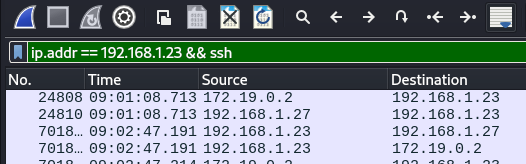
10. What time (HH:MM:SS,MS) did the attacker start brute forcing for SSH? - 09:02:47,19
For this final question I used the filter ip.addr == 192.168.1.23 && ssh, then I looked for the first packet where it looked like it began spamming them within a short amount of time.
Note for question in particular, the Time Display Format needs to be set to UTC Time of Day to get the right answer and format.
Ready - Smile - Action
Crypto - Medium
A configuration export was recovered from a secure service.
The values appear unrelated, but may hide something valuable.
Can you reconstruct the original message?
For this challenge were given a .json file containing the following:
{"meta":{"v":"2.0","fmt":"export"},"payload":
{"x":"0xb0412986bab7e54796129d3bfa82d3dd9739c95eaa07be55c81befb60b02958d462f352f8aa40c569f24fa3264f501d24cf55296adecf0a76359164c6dc35299fbdb99779fd3c38301e07f22e0dfd960b692c48b6806709c2c2eaa7e2fb7b14f658726c1c0c5f21a6a66018854b33c2ea9992c9f1b505c098aadc484817c1e99","y":"0x3","z":"0x10652cdfaa83f7514ac0121967010e2ac1a788318a105141a9a5f1a0c878d979e60d822ebc7493c4c751b410e44f5e815dd76e84f2c2d34bb45389de90ee84e67be804c94d6cebca488c8e9fd07d02378ab7c8237a0c61e45395368ce8e0cc89acede044809456f5ffb4f6498706adb8b565"}}
Then I used a python script to decrypt the flag from the given data:
import json
from Crypto.Util.number import long_to_bytes

# load JSON data
data = {
    "meta":{"v":"2.0","fmt":"export"},
    "payload":{
        "x":"0xb0412986bab7e54796129d3bfa82d3dd9739c95eaa07be55c81befb60b02958d462f352f8aa40c569f24fa3264f501d24cf55296adecf0a76359164c6dc35299fbdb99779fd3c38301e07f22e0dfd960b692c48b6806709c2c2eaa7e2fb7b14f658726c1c0c5f21a6a66018854b33c2ea9992c9f1b505c098aadc484817c1e99",
        "y":"0x3",
        "z":"0x10652cdfaa83f7514ac0121967010e2ac1a788318a105141a9a5f1a0c878d979e60d822ebc7493c4c751b410e44f5e815dd76e84f2c2d34bb45389de90ee84e67be804c94d6cebca488c8e9fd07d02378ab7c8237a0c61e45395368ce8e0cc89acede044809456f5ffb4f6498706adb8b565"
    }
}

# extract values
x = int(data["payload"]["x"], 16)  # modulus
e = int(data["payload"]["y"], 16)  # exponent
z = int(data["payload"]["z"], 16)  # ciphertext

# compute integer cube root of ciphertext, finds the integer cube root of n using binary search
def integer_cube_root(n):
    low = 0
    high = n
    while low < high:
        mid = (low + high) // 2
        if mid**3 < n:
            low = mid + 1
        else:
            high = mid
    return low

m = integer_cube_root(z)

# convert integer to bytes and print flag
flag = long_to_bytes(m)
print("Recovered message / flag:")
print(flag.decode())
Running the above script returned the flag - flag{ebfa978db8859d177a6c4fe16de06778}
Did You Read The FAQ?
Misc - Easy
Make sure to read the FAQ!
This one was extremely easy to find, as all you needed to do was go to the FAQs page of the CTF site.
Right at the top, underneath the first header, there was the flag - flag{let_the_games_begin}
Conclusion
Even though I didn’t get to spend as much time on the competition as I wanted, I’m happy with how I did.
They were a fun handful of challenges to work through, and I’ve even been working through a few of the other ones while the infrastructure is still up and available.